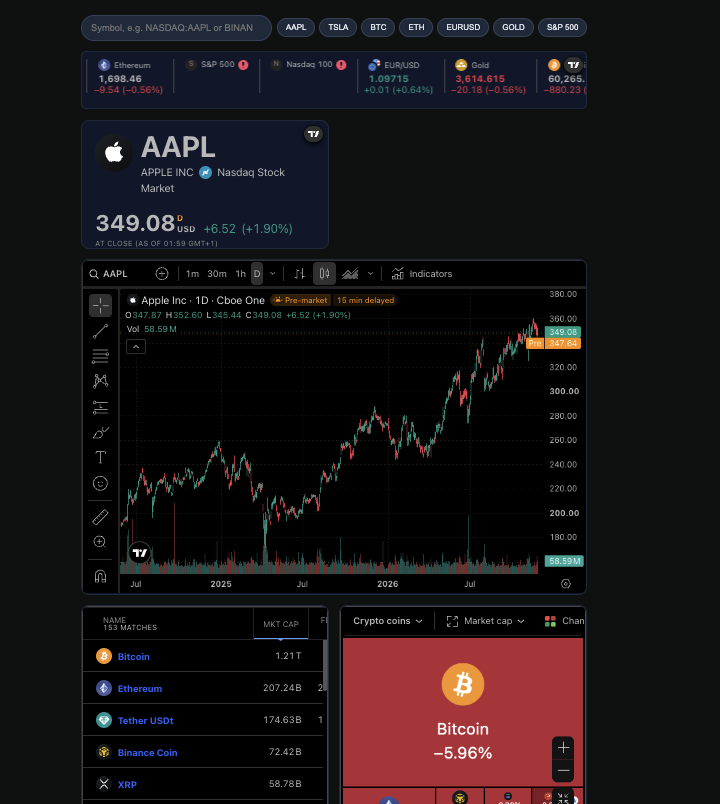
I built something for you. It’s free, it’s fast, and it solves a problem every trader has.
Meet the Live Market Dashboard
Every time I make a video, the same question shows up in the comments: “Where can I see the chart for ___ right now?” So I put everything in one place. The Live Market Dashboard gives you interactive TradingView charts, a screener, a market heatmap, technical ratings and fresh market news — on one page, with no account required.
What’s inside
- Interactive charts — the full TradingView charting engine: switch timeframes, add indicators, draw your levels. Yes, even Pine Script indicators.
- Symbol search + quick buttons — jump to Apple, Tesla, Bitcoin, Gold or the S&P 500 in one click.
- Crypto screener & heatmap — see the whole market’s moves at a glance.
- Technical ratings — the 1h buy/sell summary for whatever symbol you’re watching.
- Live market news — the headlines behind the candles.
The trick most people miss: shareable links
Here’s my favorite part. Every symbol on the dashboard has a direct link. Add ?tvwidgetsymbol=BINANCE:BTCUSDT (or any symbol) to the dashboard URL and it opens pre-loaded with that chart. I’ll be using these links in every video description from now on — click the link, see exactly what I was looking at in the video. Try it:
📈 Dashboard pre-loaded with Bitcoin
Watch the walkthrough
I recorded a full tour of the dashboard, including a few settings I personally tweak to make charting faster:
[YOUTUBE EMBED HERE]
👉 [Subscribe to the channel] for weekly TradingView, Pine Script and personal finance videos.
Pair it with the free tools
The dashboard works great together with the other free tools on the site:
- Position Size & Risk Calculator — size any trade in seconds
- Win Rate vs. Risk-Reward Calculator — check if your strategy has positive expectancy
- Compound Interest Calculator — see what your investing could become
- Fibonacci Calculator — retracements without drawing
Got an idea for a symbol, tool or widget that should be on the dashboard? Drop it in the comments — the best ones get built in a future video.
Leave a Reply